The First Step Towards PyTBV: Breaking Simulator Dependence in cocotb + pyuvm
A while back, I shared a post on LinkedIn about an idea I wanted to explore, running cocotb and pyuvm without a hardware simulator. After nights of experimenting, I’m sharing the first working step of that idea. And that step is now taking shape as PyTBV, a lightweight path toward transaction based verification in pure Python. There have been similar efforts before: cocotb-stub-sim for basic stubbing, and cocotb-vivado for Vivado integration. What I’ve done is build on those concepts and push them forward into the world of cocotb 2.0 and the latest pyuvm, bringing them together into a clean, usable prototype.
The initial PyTBV prototype proves something simple but important, you can run:
cocotb initialization
pyuvm components
transaction modelling TLM ports
without launching a hardware simulator. As long as the code avoid HDL signals access, it works completely standalone. That immediately opens the door to:
prototyping UVC architecture
building and debugging scoreboards
experimenting with transaction pipelines
unit-testing verification logic
All of it in plain Python, without touching RTL or waiting for a simulator license. For a reference, checkout tests/test_basic_pyuvm.py in the PyTBV repo. When running the example, you will be able to simulate transaction passing between UVM components. One thing to be aware of, the “time” you see in the logs isn’t real simulation time. There’s no time wheel in this environment. Everything executes as untimed events, and any delay you see is simply placeholder behavior that would normally be handled by an actual simulator.
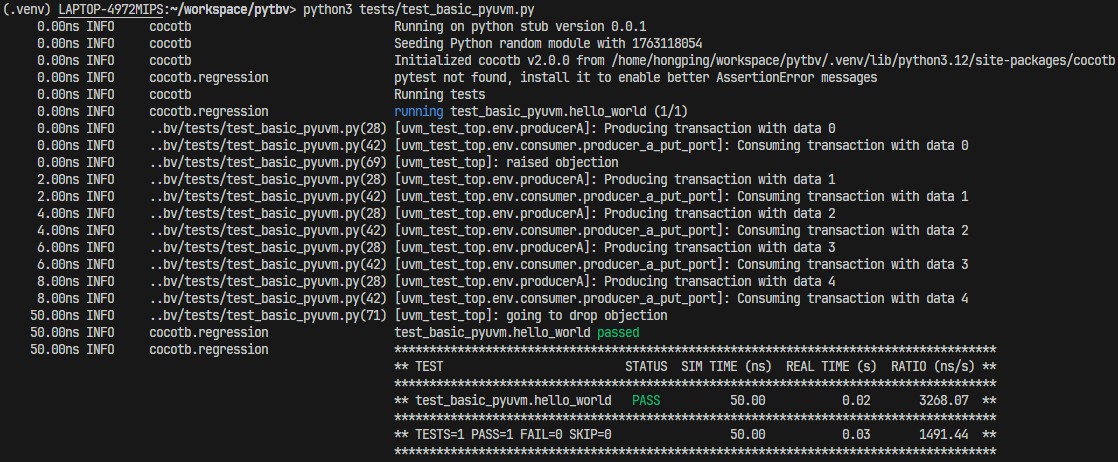
This is the “first step” I hinted at in my earlier post — now it’s real.
What’s Next: CSV -> Stream Transaction -> Mock DUT
With standalone cocotb + pyuvm running, the next natural step is giving it realistic data flow, which I’m currently building support for:
Reading CSV files as transaction sources. Each line describes a protocol event, a packet, a bus transaction, etc.
Streaming the data into a mock hardware layer. This layer mimics a DUT at a conceptual level — no signals, no timing wheel.
pyuvm monitors consuming these transactions. Monitors observe the incoming stream just like they would in real simulation.
Routing traffic into the correct agents/UVCs. Different transaction types can be cleanly mapped to different agents.
With this and hopefully it works, will be the basis of the idea where we can record transactions and run through them with existing pyuvm environment, without real HDL simulator.
The Road Ahead
There’s a lot more I want to explore. The CSV-based streaming flow is only the first use case. Once that’s solid, the next step is to standardize the kernel and simulation object so users can extend PyTBV with their own transaction streaming models - offline, live, or even connecting to emulation platforms.
Try the Prototype
Repo here: https://github.com/hongping/pytbv. You’ll find:
basic pyuvm test
the stubbing/kernel mechanism
examples
This continues the direction I announced earlier — except now there’s something concrete one can actually try.
Disclaimer:
Opinions expressed are solely my own and do not express the views or opinions of my employer.
All works are done with personal computing device and during personal time.