Proof of Concept: PyTBV to Stream Transactions from CSV
Building on my earlier effort to get cocotb and pyuvm running without a real simulator, I’ve added another kernel that streams recorded transactions from a CSV directly into a pyuvm agent. The implementation is now available in the PyTBV repository. One more twist this time: the entire development happened inside Google’s new Antigravity, with most of the coding driven by Gemini 3 Pro. I’ll share more about that experience in a separate post.
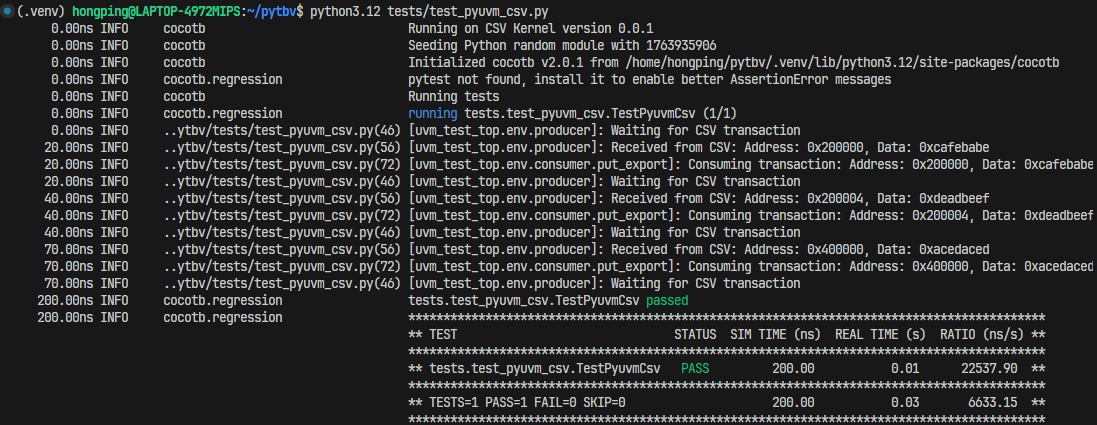
With this kernel in place, it’s showed clearly that recorded transactions can be replayed in an offline, structured UVM-style environment, allowing verification work to continue without depending on a real simulator. As long as transactions are captured, new checks can be built, coverage can be added, and multiple iterations can be carried out quickly.
Some Technical Details
Let’s dig into a bit of the technical side. The code below shows a typical UVM monitor, whether in Python or SystemVerilog, the idea is the same. Normally, the monitor watches a signal or port and captures transactions when activity occurs. In the PyTBV CSV-streaming setup, this behavior is replaced with a custom trigger, CsvTrigger, which drives the monitor based on CSV-recorded events instead of DUT signal changes.
1
2
3
4
5
6
7
8
9
10
11
12
13
14
15
16
17
18
19
20
21
22
23
24
25
26
27
class Producer(uvm_component):
    def __init__(self, name, parent):
        super().__init__(name, parent)

    def build_phase(self):
        self.put_port = uvm_blocking_put_port("put_port", self)

    async def run_phase(self):
        # Loop until simulation ends
        while True:
            self.logger.info(f"Waiting for CSV transaction")
            try:
                # Wait for trigger from CSV on Port "A"
                t = await CsvTrigger("A")

                # Create UVM transaction
                tr = UvmTransaction()
                tr.address = t.transaction.address
                tr.data = t.transaction.data

                self.logger.info(f"Received from CSV: {tr}")

                # Send to consumer
                await self.put_port.put(tr)

            except Exception as e:
                self.logger.error(f"Error waiting for transaction: {e}")
Once the CSV kernel detects a transaction destined for the target port, port A in this case, the trigger is fired. The monitor loop resumes from that point, with the transaction data supplied through the trigger’s return value. The example can be found in the repository - tests/test_pyuvm_csv.py
This approach isn’t limited to CSV. The base kernel can be extended to interface with any transaction storage medium, VCD waveforms, SQL databases, DuckDB, and so on. The code below shows how CSVKernel derives from the base kernel and how a custom cocotb trigger is created. The first step is defining a trigger that allows a coroutine to be spawned and enables the Python test flow to await the next transaction; this is handled by the Transaction trigger. The next step is providing an interface for registering that trigger. In the CSVKernel example, this is implemented through register_transaction_callback. The run method then needs to be updated to define how each transaction is streamed to its respective port. It might look like a lot of work, but it isn’t. The core pieces are straightforward: define the trigger, register the trigger callback, and implement how the mock simulator executes the run flow.
1
2
3
4
5
6
7
8
9
10
11
12
13
14
15
16
17
18
19
20
21
22
23
24
25
26
27
28
29
30
31
class Transaction(GPITrigger):
    def __init__(self, port_name):
        super().__init__()
        self.port_name = port_name
        self._cbhdl = None

    def _prime(self, callback):
        if self._cbhdl is None:
            self._cbhdl = cocotb.simulator.register_transaction_callback(self.port_name, None, callback, self)
            if self._cbhdl is None:
                raise RuntimeError(f"Unable set up {self!s} Trigger")
        super()._prime(callback)

    def __repr__(self):
        return f"Transaction({self.port_name!r})"

class CSVKernel(Kernel):
    def __init__(self, **kwargs):
        super().__init__(**kwargs)
        self.version = "0.0.1"
        self.product = "CSV Kernel"
        self.transaction_listeners = collections.defaultdict(list)
        self.csv_events = []

        if "csv_path" in kwargs:
            self.load_transactions(kwargs["csv_path"])

    def register_transaction_callback(self, port, txn, cb, ud):
        ret = CbTransaction(port, txn, cb, ud)
        self.transaction_listeners[port].append(ret)
        return ret
What makes this even better is that PyTBV’s run method accepts a kernel_cls argument, allowing the kernel to be swapped without modifying the verification framework. With a well-structured monitor, scoreboard, and coverage setup, the same code can run across different kernels. This enables seamless reuse of the exact same source.
1
2
3
4
5
6
7
if __name__ == "__main__":
    import argparse
    parser = argparse.ArgumentParser()
    parser.add_argument("--csv", default="tests/transactions.csv")
    args = parser.parse_args()

    run("tests.test_pyuvm_csv", kernel_cls=CSVKernel, csv_path=args.csv)
What’s Next?
Now that the CSV-based transaction streaming approach has been proven, replaying transactions into cocotb and pyuvm in a post-processing mode without a real simulator, the next steps are clear. First, clean up the framework and package it as an official Python library (pip distribution) with proper documentation. Second, add more kernels as both examples and real-world options. Finally, explore live-simulation support: in that mode the monitor would act as a bridge between the hardware simulator and the transaction recording/streaming agent, enabling both recording and steering in real time.
Try the CSVKernel
The repository is available here: https://github.com/hongping/pytbv. The CSV example can be found in tests/test_pyuvm_csv.py. This test reads transactions from tests/transactions.csv, or from any CSV you provide via the --csv argument. The CSV file must include a header line starting with #, and must contain at least the Time and Port columns. All remaining fields will be dynamically expanded by the CSVKernel and its trigger.
Happy trying and please feedbacks if you have any!
Disclaimer:
Opinions expressed are solely my own and do not express the views or opinions of my employer.
All works are done with personal computing device and during personal time.